
TikTok captions that keep
viewers watching past
the first 3 seconds
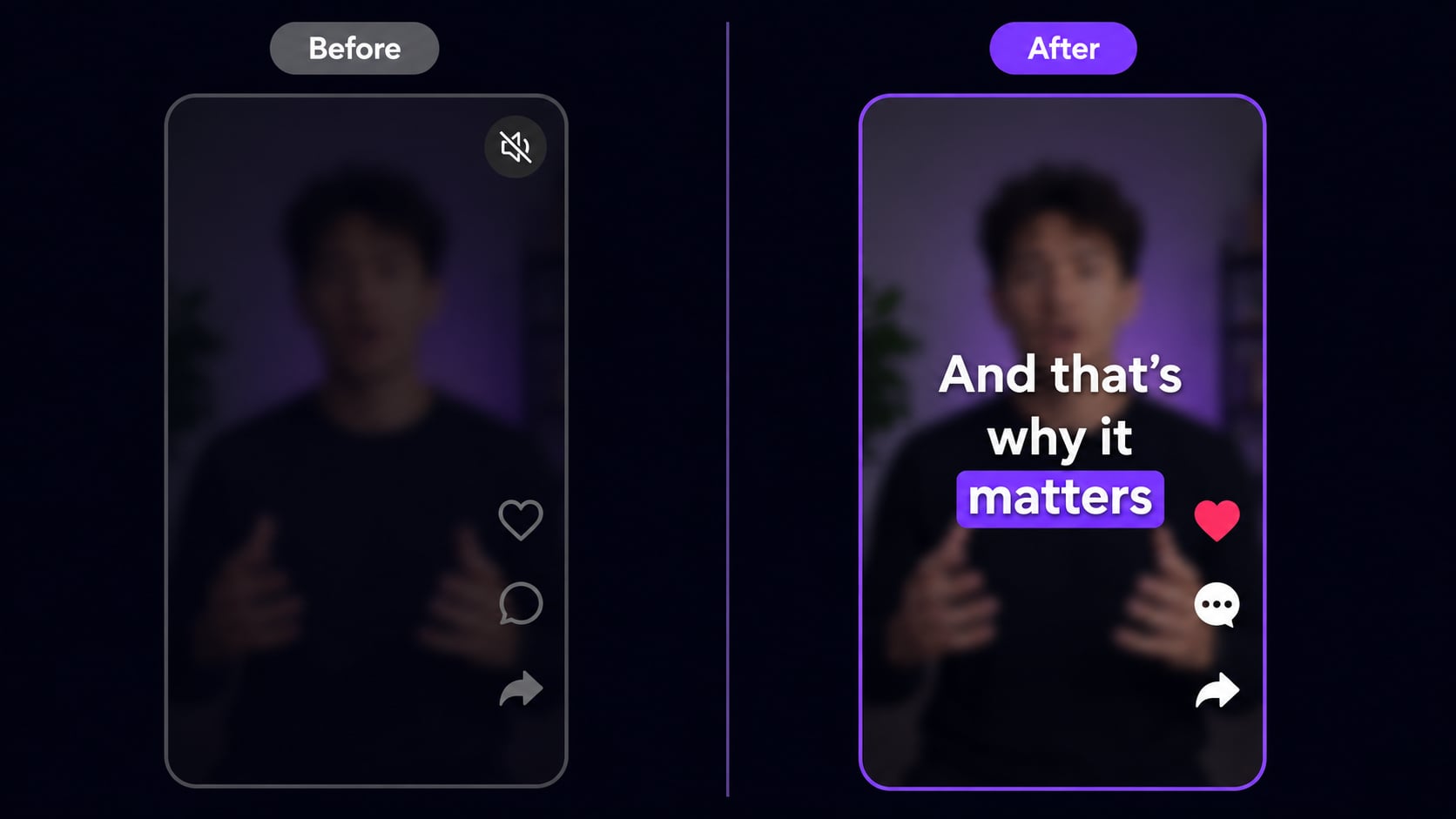
85% of TikTok videos are watched without sound. No captions means most of your audience misses the message and scrolls on. AutoCaption adds styled, animated captions in under 10 seconds. No manual syncing. No SRT files.
No credit card required · Free plan · Exports in 9:16
Why captions are not optional anymore
The algorithm does not care if your content is good.
It cares about watch time.
85%
of TikTok videos watched on mute
No captions means most viewers miss your message entirely before they scroll.
+40%
longer average watch time with captions
Viewers read the words and stay in the video even when they cannot hear it.
2x
higher completion rate for captioned videos
Captioned videos get watched to the end twice as often. That signal pushes you to more For You pages.
Caption styles
The styles that perform on TikTok
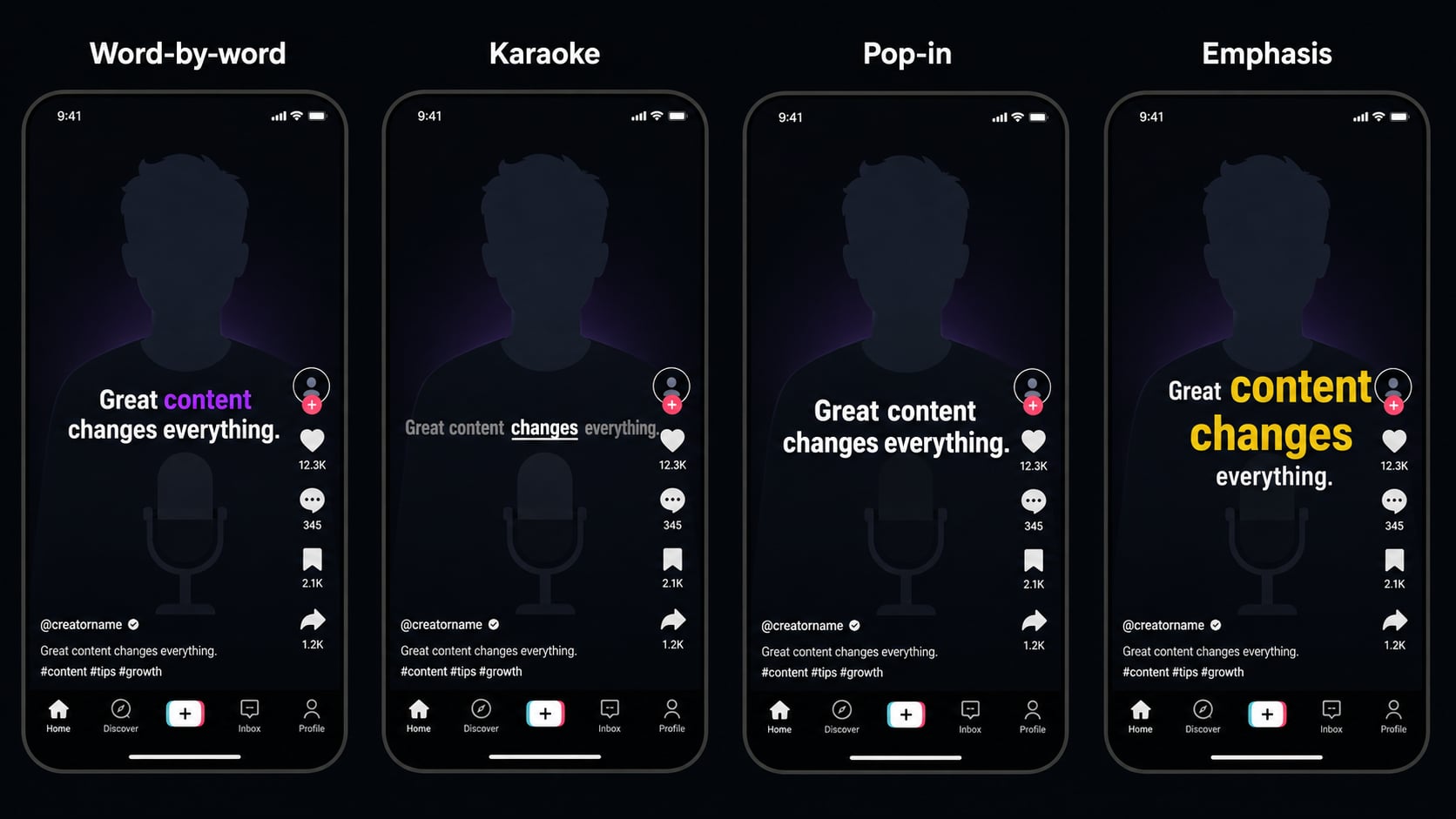
Not all captions are equal. These are what top creators use to maximize watch time.
Word-by-word
Most popularEach word appears as it is spoken. Keeps viewers reading in real time. This is the style you see on every viral TikTok. AutoCaption does this automatically, with no manual timing.
Karaoke highlight
High retentionWords appear in a full line and highlight as they are spoken. Great for music content, tutorials, or anything where you want viewers to follow along at a steady pace.
Pop-in sentences
Clean and punchyFull sentences appear and disappear at the right time. Cleaner look than word-by-word. Works well for talking-head videos where the delivery is slower and deliberate.
Emphasis captions
For storytellingKey words are bigger, bolder, or a different color. Draws the eye to the most important parts of what you are saying. AutoCaption can detect emphasis automatically.
How to use it
From raw video to TikTok-ready
in under 2 minutes
Upload your video
30 secAny format. Recorded on your phone, exported from CapCut or Premiere. If you filmed it, it works.
AI transcribes the audio
10 secAutoCaption reads what you said and creates perfectly timed captions in under 10 seconds. Word for word.
Pick a TikTok style
30 secChoose from word-by-word, karaoke, or sentence styles. Customize font, color, size, and position in the editor.
Export 9:16 and post
InstantDownload the captioned video in TikTok format and upload directly. Captions are burned in. Done.
Built specifically for TikTok's format
Generic caption tools add captions. AutoCaption adds captions that work for the TikTok algorithm.
9:16 safe-zone positioning
Captions are placed inside the safe zone: below the top overlay and above the bottom navigation bar. Nothing gets cut off by the TikTok UI. You do not have to think about this. AutoCaption handles it automatically based on where the platform renders its chrome.
TikTok-native fonts
Bold, high-contrast fonts that read clearly on any background. No tiny serif text that disappears on phone screens at 6 inches.
100+ languages
Transcribe and caption in any language. Useful for multi-market content or reaching non-English audiences.
Under 10 seconds per video
Caption a video in the time it takes to answer a notification. No waiting, no queue, no batch processing delays. If you publish 5 videos a day, you are spending under a minute on captions total.
FAQ
TikTok caption questions
How do I add captions to TikTok videos?
Upload your video to AutoCaption, let the AI transcribe, pick a TikTok style, and export. Under 10 seconds for most videos. Upload the finished file directly to TikTok.
What caption style works best on TikTok?
Word-by-word animated captions consistently get the best watch time. They match the pace of speech, keep viewers reading along, and reduce drop-off at the start. AutoCaption has this as a one-click preset.
Does AutoCaption support TikTok's 9:16 aspect ratio?
Yes. AutoCaption exports in 9:16 by default for TikTok. Captions are positioned in the safe zone so nothing is covered by TikTok's interface elements.
Can I use AutoCaption for free on TikTok videos?
Yes. AutoCaption has a free plan with no credit card required. Paid plans unlock more videos per month, higher export resolution, and more caption styles.
Start for free
Your next TikTok is
10 seconds from done
Upload, caption, export. That is the whole workflow. No account required to start.
✦ Try AutoCaption free300,000+ creators already posting faster